正在加载项目…

6,969 GitHub Stars1 项组成内容Stars 同步于 2026年9月27日
正在读取官方项目说明…
正在加载项目…
正在读取官方项目说明…
内容来自 GitHub 原始文件,由原作者维护。在 GitHub 查看
A skill for AI coding agents that scaffolds a production-ready Next.js editor for App Store and Google Play marketing screenshots. It gives you a connected canvas, real device frames, inspector controls, persistent project state, and one-click export bundles at store-ready sizes.
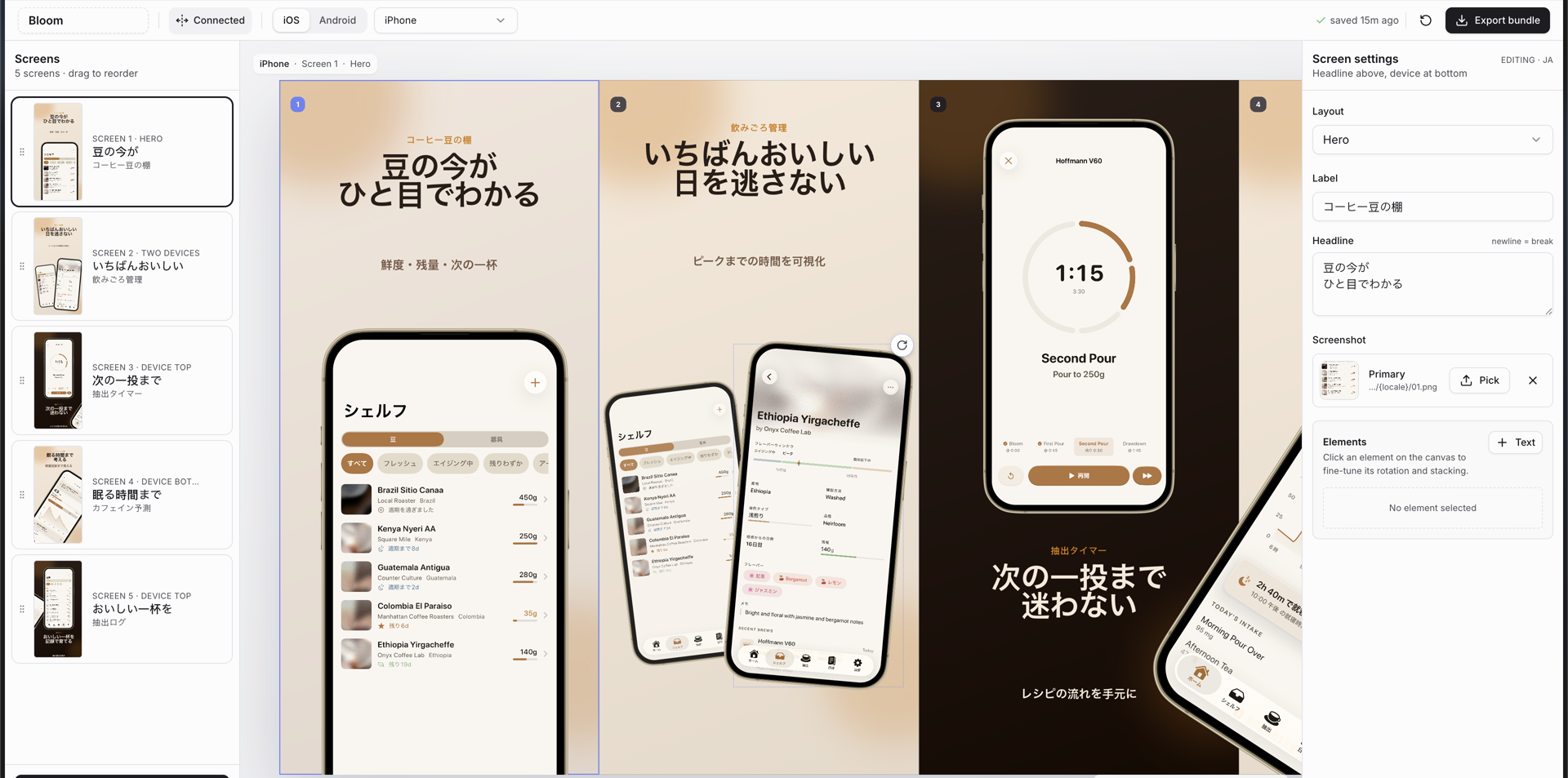
Example screenshots generated with this skill were accepted for Bloom Coffee Shelf Recipe on the App Store.
app-store-screenshots.json, so the project is git-trackable and resumablepublic/screenshots/uploaded/<hash>.png/api/project and mirrors to localStorage for instant reloads.Tip: when capturing source iPhone screenshots, the 6.1-inch simulator is usually the easiest starting point because it reduces manual image adjustment inside the frames.
npx skills add ParthJadhav/app-store-screenshots
Install globally:
npx skills add ParthJadhav/app-store-screenshots -g
Install for a specific agent:
npx skills add ParthJadhav/app-store-screenshots -a claude-code
This works with Claude Code, Cursor, Windsurf, OpenCode, Codex, and other agents supported by skills.
git clone https://github.com/ParthJadhav/app-store-screenshots ~/.claude/skills/app-store-screenshots
Once installed, ask your coding agent for store screenshots:
Build App Store and Google Play screenshots for my app.
The skill guides the agent to ask for your app context, source screenshots, platforms, locales, visual direction, and slide count before generating the editor project.
Build App Store screenshots for my habit tracker.
The app helps people stay consistent with simple daily routines.
I want 6 slides, clean minimal style, warm neutrals, and a calm premium feel.
Generate App Store screenshots for my personal finance app.
The main strengths are fast expense capture, clear monthly trends, and shared budgets.
I want a sharp modern style with high contrast and 7 slides.
Build Mac App Store screenshots for my menu-bar utility.
The app lives in the menu bar and finds files on this Mac instantly.
I want 5 slides, a dark Mac window frame, and a calm desktop feel.
Build App Store screenshots for my language learning app.
I need English, German, and Arabic screenshot sets.
Use two reusable themes: clean-light and dark-bold.
Make sure Arabic slides feel RTL-native, not just translated.
If starting from an empty folder, the skill creates a Next.js project like this:
project/
├── public/
│   ├── mockup.png
│   ├── app-icon.png
│   └── screenshots/
│       ├── apple/
│       │   ├── iphone/{locale}/01.png
│       │   ├── ipad/{locale}/01.png
│       │   ├── tvos/{locale}/01.png
│       │   ├── watchos/{locale}/01.png
│       │   ├── carplay/{locale}/01.png
│       │   └── mac/{locale}/01.png
│       └── android/
│           ├── phone/{locale}/01.png
│           ├── tablet-7/portrait/{locale}/01.png
│           ├── tablet-10/landscape/{locale}/01.png
│           └── feature-graphic/{locale}/01.png
├── app-store-screenshots.json
├── src/app/
│   ├── layout.tsx
│   └── page.tsx
├── src/components/editor/
│   ├── screenshot-editor.tsx
│   ├── toolbar.tsx
│   ├── sidebar.tsx
│   ├── inspector.tsx
│   ├── preview-stage.tsx
│   ├── slide-canvas.tsx
│   ├── screenshot-picker.tsx
│   └── device-frames.tsx
└── src/lib/
    ├── constants.ts
    ├── defaults.ts
    ├── storage.ts
    ├── image-cache.ts
    ├── export-render.ts
    └── types.ts
The template README inside skills/app-store-screenshots/template/README.md documents the editor internals in more detail.
Uploaded files are saved under public/screenshots/uploaded/, and the canonical deck state is saved in app-store-screenshots.json. Commit both to make the deck reproducible after a fresh clone.
| Device | Resolution |
|---|---|
| iPhone 6.9" | 1320 x 2868 |
| iPhone 6.5" | 1284 x 2778 |
| iPhone 6.3" | 1206 x 2622 |
| iPhone 6.1" | 1125 x 2436 |
| iPad 13" | 2064 x 2752 |
| iPad Pro 12.9" | 2048 x 2732 |
| Apple TV | 3840 x 2160, 1920 x 1080 |
| Apple Watch Ultra | 422 x 514, 410 x 502 |
| Apple Watch Series 10 | 416 x 496 |
| Apple Watch Series 7 | 396 x 484 |
| Apple Watch Series 4 | 368 x 448 |
| Apple Watch Series 3 | 312 x 390 |
| CarPlay (iPhone slot, landscape) | 2868 x 1320, 2778 x 1284, 2622 x 1206, 2436 x 1125 |
App Store Connect has no CarPlay screenshot slot: CarPlay shots are uploaded into the iPhone slot, so the CarPlay deck exports landscape iPhone sizes with a head-unit frame.
| Device | Resolution |
|---|---|
| Mac (16:10) | 2880 x 1800, 2560 x 1600, 1440 x 900, 1280 x 800 |
Mac has its own Mac tab because App Store Connect lists macOS as a separate platform from the iOS app. Its bundle exports to macos/mac/<WxH>/<locale>/, next to ios/... and android/.... The Mac window frame has a 16:10 content area, so a full-screen 16:10 capture fills it without cropping.
| Device | Resolution |
|---|---|
| Phone portrait | 1080 x 1920 |
| 7" tablet portrait | 1200 x 1920 |
| 7" tablet landscape | 1920 x 1200 |
| 10" tablet portrait | 1600 x 2560 |
| 10" tablet landscape | 2560 x 1600 |
| Feature graphic | 1024 x 500 |
Screenshots are designed at the largest size for each device and scaled down for smaller exports. Every export waits until each screenshot has actually painted (Safari/WebKit decodes them asynchronously) and warns instead of silently writing a blank device. Android, iPad, Apple TV, Apple Watch, CarPlay and Mac frames are CSS-rendered, while iPhone uses the included mockup.png bezel.
app-store-screenshots.json is the source of truth for app name, active platform, active device, locales, theme, connected-canvas mode, slides, screenshot paths, and transforms.public/screenshots/uploaded/<hash>.png.localStorage first for fast paint, then reconciles with the project file.src/lib/constants.ts; unknown theme ids fall back to clean-light.The skill ships 18 named visual styles. Each one has a deep spec in skills/app-store-screenshots/style-prompts/ covering palette, typography, headline emphasis, layout rhythm, decoration density, cross-screen moments, and copy voice. Browse rendered samples and copy-paste prompts in the style gallery.
| Style | Good for |
|---|---|
| Hand-Drawn Editorial Tasks | Productivity, tasks, notes with designer taste |
| Retro Rubberhose Mascot | Cozy habit and wellness apps with a mascot |
| Moody Curated Dating | Members-only dating, dinner clubs, premium lifestyle |
| Paper Sticker Skeuomorphic | Student organizers, notes, hobby apps |
| Dreamy Pastel Couples | Couples, long-distance, pet companions |
| Glossy 3D K-Beauty Creator | Creator economy, fan communities, beauty |
| Liquid Glass Aurora | Premium iOS-native utilities, AI assistants |
| Swiss Grid Bold | Finance, dev tools, analytics, B2B |
| Neon Athletic Night | Fitness, running, strength, recovery |
| Magazine Cover Editorial | Food, recipes, reading, travel, coffee |
| Candy Pop Social | Social, friends, events, gen-Z consumer |
| Soft Clay Wellness | Meditation, sleep, journaling, health |
| Midnight Glow Pro | AI, dev tools, pro productivity, power-user finance |
| Risograph Zine | Music, events, podcasts, indie creative apps |
| Bento Keynote Grid | Feature-dense productivity, health, finance, utilities |
| Toybox Primary | Kids learning, families, beginners, casual games |
| Quiet Japandi | Notes, calendars, reading, tea, minimalist utilities |
| Vintage Travel Poster | Travel, maps, outdoors, weather, road trips |
Name a style in your prompt ("use Swiss Grid Bold") and the agent applies the whole spec. Every named style also has a matching palette preset in the editor's toolbar theme picker.
For headlines, skills/app-store-screenshots/copy-ideas.md has formulas per slide role, ready lines for 13 app categories, eyebrow labels, a weak-to-better table, deck arcs, and localization notes. The same formulas sit in the inspector's Copy ideas menu next to the headline field.
| Dependency | Purpose |
|---|---|
| Next.js | Dev server and app shell |
| React | Editor UI |
| TypeScript | Project and slide state safety |
| Tailwind CSS | Styling |
| shadcn/ui + Radix | Controls, dialogs, selects, tooltips |
| html-to-image | Exact PNG rendering |
| JSZip | Bundle downloads |
| dnd-kit | Screen reordering |
| react-rnd | Draggable and resizable canvas elements |
Contributions are welcome, especially around export reliability, screenshot design guidance, migrations, and cross-agent compatibility. Start with CONTRIBUTING.md.
MIT
Created by Parth Jadhav.